EW 2 misc talk

Helloooo,

Thought to create this thread for anything that isn’t ‘questions’/‘gallery’/ etc, and Imma start with this:

What’s your favourite/least favourite BP types? For fav. would be the RBCs, XBCs and t8s, least favs GluMIs, and t1s, convoluted little thorny things that require tiny jagged points to be checked and annotated wasting my time lol (9.9/10 don’t lead to anything but they still must be checked and annotated.)

3 Likes

and b/c I can see celia’s request to keep the questions thread ‘clean’ I’m moving that convo here, @KrzysztofKruk lol.

1 Like

‘my’ leaderboard’s numbers are also off, for some reason in the weekly and monthly portions there are 0’s for people that should not be 0, like you (KK) and/or Andrea/ash, but chatgpt’s no longer helpful, instead of identifying the problem it keeps changing the code

[…### I have an even better idea

Since I’ve seen your sheet now, I can write the formulas specifically for your spreadsheet using the newer Google Sheets functions GROUPBY() and PIVOTBY() (if your Sheets supports them). Those formulas are much shorter, don’t have the QUERY() header issue at all, and are easier to maintain.

I think it’s worth switching if your version of Google Sheets has those func…]

I don’t want you to change that you glorified bean counter for an ‘artificial inteligence’ I want you to figure out why those are 0s and change the code so that they are the actual freaking numbers… lol

Have you tried to just copy the formula you made yesterday to three columns, Do not really matter if there is a dropdown menu on them. From what i remember it looked like that code was working?
just make sure to change B1 to the new column and ad a couple of $ to Focused BCs’!$I:$K to make sure that are not changing,

think this was the code that worked
=LET(
startDate,
SWITCH(B1,
“Daily”,TODAY(),
“Weekly”,TODAY()-WEEKDAY(TODAY(),2)+1,
“Monthly”,EOMONTH(TODAY(),-1)+1),

endDate,
SWITCH(B1,
“Daily”,TODAY()+1,
“Weekly”,TODAY()-WEEKDAY(TODAY(),2)+8,
“Monthly”,EOMONTH(TODAY(),0)+1),

QUERY(
‘Focused BCs’!I:K,
“select I, count(I)``
where I is not null
and K >= date '”&TEXT(startDate,“yyyy-MM-dd”)&"’
and K < date ‘"&TEXT(endDate,“yyyy-MM-dd”)&"’
group by I
order by count(I) desc",
0),

HSTACK(
ARRAYFORMULA(
IF(
SEQUENCE(ROWS(leaders))=1,“:1st_place_medal:”,
IF(
SEQUENCE(ROWS(leaders))=2,“:2nd_place_medal:”,
IF(
SEQUENCE(ROWS(leaders))=3,“:3rd_place_medal:”,
SEQUENCE(ROWS(leaders))
)))
),
leaders
)
)

1 Like

i like RBC and 4, t3 are not too bad either. do not remember what they are called but those fragmented cells where you need to find the steam i have a bit of love/ hate relationship with. Very great to find more branches where i think there should not be any, but oh so frustrating when you cant find the steam.
and agree with you about t1 beeing one of my least favorite ones

1 Like

the problem with yday’s code is that SWITCH there, (which switches between day/week/month when a user selects between day/week/month in the dropdown menu), w/o the dropdown menu it returns errors, I don’t know how to change that and b/c I’m on a free plan w/ chatgpt I can’t further ask it anything until 8pm my time, so in 3 half hrs. lol, if you know how to take this code:

=LET(
startDate,
SWITCH(B1,
“Daily”,TODAY(),
“Weekly”,TODAY()-WEEKDAY(TODAY(),2)+1,
“Monthly”,EOMONTH(TODAY(),-1)+1),

endDate,
SWITCH(B1,
“Daily”,TODAY()+1,
“Weekly”,TODAY()-WEEKDAY(TODAY(),2)+8,
“Monthly”,EOMONTH(TODAY(),0)+1),

leaders,
QUERY(
‘Focused BCs’!I:K,
“select I, count(I)
where I is not null
and K >= date '”&TEXT(startDate,“yyyy-MM-dd”)&"’
and K < date ‘"&TEXT(endDate,“yyyy-MM-dd”)&"’
group by I
order by count(I) desc",
0),

HSTACK(
ARRAYFORMULA(
IF(
SEQUENCE(ROWS(leaders))=1,“:1st_place_medal:”,
IF(
SEQUENCE(ROWS(leaders))=2,“:2nd_place_medal:”,
IF(
SEQUENCE(ROWS(leaders))=3,“:3rd_place_medal:”,
SEQUENCE(ROWS(leaders))
)))
),
leaders
)
)

and change it as needed so that SWITCH is not needed and day/ week/ month can go in their respective rows+ cells please do, otherwise we wait lol

just add the dropdown menu for all columns

don’t have to, I returned to an earlier code of the non-dropdown menu and it counts the players and numbers correctly but creates a hidden header so that the 1st place ‘gold medal’ appears next to players and count vs where it should be. In its effort to fix that chatgpt errored the counts. I’ve pasted that into the gsheet, and am trying to fix the hidden header w/o bugging out the counts.

use white letters and change the count for the medals with +1 could also make row 3 hidden

1 Like

Good thinking…that took longer to figure out than I’d’ve liked xD

I made some changes in the Leaderboard History tab, is this better? @annkri @KrzysztofKruk

I think it is better, but i am a bit confused about the end of week and end of month, looks like you have managed to add it a day late?
Have you done it manually or did you find some way to do it automatic?
I added a summary for each month so far

1 Like

gemini (tried something else other than chatgpt) added those bits of code. you can review it in extensions > apps scripts > leaderboard history.gs

1 Like

I’m sorry @annkri I did some changes in the Leaderboard History tab/script and deleted the code you added for the Monthly summary by mistake, and now I can’t find it in the sheet history/revision, I hope it’s not too time consuming to re-create that.

added it back, i made one pr week and one for end of month. i think the most useful would be to add it too your script so when it add the line for each week and month it add a summary also

1 Like

I can try sometime later in the week/weekend, I need to un-frustrate myself first from using the chatbot before re-using it, lol

1 Like

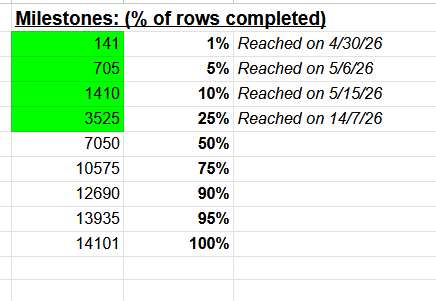
Woooot!
image

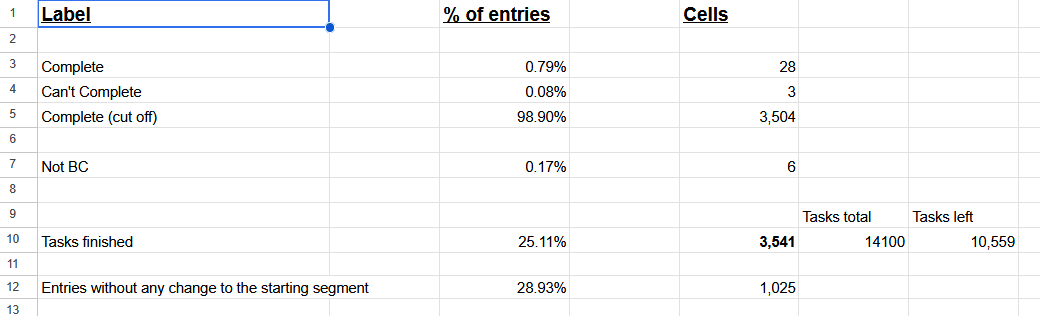
We reached 25% done!

4 Likes

FYI: Someone, probably accidentally, deleted a couple hundred of final seg IDs from the sheet. It was the last couple of hundreds (i.e. the newest). I’ve seen them restoring the IDs one by one from the final links, so I’ve stepped in and did a quick script to read all the segment IDs from the links automatically. Since it was a quick work, I didn’t implement any checking, just read the first segment from the second layer from each of the links. It seemed to work correctly, but if anyone had left more than one segment in their final link, there might be an issue. Let me know, if there was such a case and I’ll modify the script to read the data correctly.

2 Likes

Managed to find a old version of the sheet and cheek that all the segments are correct now. Only one segment that are not the same as the old list, and that one is wrong in the old list. The new id is the updated version of same cell. But have seen that there are some links with more than one cell.

But i have no idea how i manage to delete several hundred cells using cmd + v on a single cell and instead of getting the seg id i was supposed to paste i get several hundres rows of something looking like a script from neuroglancer.

1 Like

Oh, it was you. I thought, maybe some of those few new players, that appeared recently. But, as they say every cloud has a silver lining, because you’ve found an incorrect segment, that would otherwise be unnoticed. I’ll keep in mind for the future, that there are some links, that have multiple segments. Thanks!

2 Likes